Tasks
The nmk-base plugin defines the tasks described below.
Meta tasks
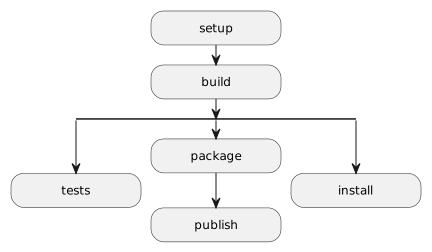
This plugin defines some meta tasks that can be used by other plugins as kind of build “phases”. Depending on what the user want to do, the different available workflows are illustrated by the diagram below:
Note
As nmk supports any tasks combination, it is possbile to get any other build workflow combination by specifying the task names on the command line.
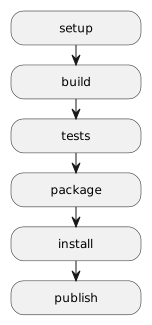
E.g. an nmk tests package install publish command results in the following workflow:
setup task
The setup task aims to be the first phase of the build, allowing to perform prebuild operations like config files generation, dependencies checking, etc…
build task
The build task shall be used to perform all operation that build temporary and/or artifact files for the current project.
It is the default build task (i.e. this is the built task when nmk is invoked without argument).
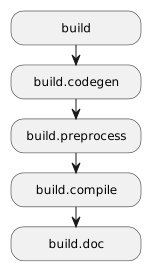
It firstly depends on the setup task, and is then composed of several sub-tasks, allowing plugins to easily contribute to a given build phase. These sub-tasks are detailed in the following chapters.
build.codegen task
The build.codegen task can be used to hook any code generation task, i.e. any process that creates/updates source code files expecting to be part of the build.
Added in version 1.5.0
build.preprocess task
The build.preprocess task can be used to hook any code preprocessing task, e.g.:
code format
code linting/static analysis
etc…
Added in version 1.5.0
build.compile task
The build.compile task can be used to hook any compilation task (whatever it means for any supported programming language)
Added in version 1.5.0
build.doc task
The build.doc task can be used to hook any documentation build task.
Added in version 1.5.0
tests task
The tests task shall be used to perform all automated testing operations on generated software.
It depends on the build task.
package task
The package task shall be used to package project artifacts from generated software.
It depends on the build task.
install task
The install task shall be used to install generated software locally.
It depends on the build task.
publish task
The publish task shall be used to publish built artifacts where they should be stored, as decided by the project.
It depends on the package task.
clean task
The clean task shall be used to clean the project built files.
Helper tasks
version – display version
Property |
Value/description |
|---|---|
builder |
The version task will list the versions of nmk itself, plus all plugin versions contributed to ${nmkPluginsVersions} object.
Example:
$ nmk version
2022-02-20 14:37:02 (I) [version] 🏷  - Display used nmk + plugins versions
2022-02-20 14:37:02 (I) [version] 🏷  -  👉 nmk: 0.0.0.post37+gf907587
2022-02-20 14:37:02 (I) [version] 🏷  -  👉 base: 1.0.0
2022-02-20 14:37:02 (I) nmk 🏁 - Done
help – display help links
Property |
Value/description |
|---|---|
builder |
The help task will list the help page URL of nmk itself, plus all plugin pages URLs contributed to ${nmkPluginsDocs} object.
Example:
$ nmk help
2022-02-20 14:42:24 (I) [help] 🆘 - Display online help links
2022-02-20 14:42:24 (I) [help] 🆘 -  👉 nmk: https://nmk.readthedocs.io/
2022-02-20 14:42:24 (I) [help] 🆘 -  👉 base: https://nmk-base.readthedocs.io/
2022-02-20 14:42:24 (I) nmk 🏁 - Done
tasks – list known tasks
Property |
Value/description |
|---|---|
builder |
The tasks task will list all the known tasks for the built project.
Example:
$ nmk tasks
2022-02-20 14:43:18 (I) [tasks] 🗃 - List all available tasks
2022-02-20 14:43:18 (I) [tasks] 🧹 -  👉 clean: Clean build output
2022-02-20 14:43:18 (I) [tasks] 🛫 -  👉 setup: Setup project configuration
2022-02-20 14:43:18 (I) [tasks] 🛠 -  👉 build: Build project artifacts
2022-02-20 14:43:18 (I) [tasks] 🤞 -  👉 tests: Run automated tests
2022-02-20 14:43:18 (I) [tasks] 🏷 -  👉 version: Display used nmk + plugins versions
2022-02-20 14:43:18 (I) [tasks] 🆘 -  👉 help: Display online help links
2022-02-20 14:43:18 (I) [tasks] 🗃 -  👉 tasks: List all available tasks

...

2022-02-20 14:42:24 (I) nmk 🏁 - Done
git.clean – full clean
Property |
Value/description |
|---|---|
builder |
The git.clean task will use git to clean the project folder, i.e. by removing all git ignored files.
Warning: this will remove (at least) both the venv and .nmk folders. Consequently, the build will immediately stop after this task, ignoring other tasks eventually specified on the command line. After this task is executed, the buildenv loading scripts will have to be used again to setup the project and reinstall nmk
Setup tasks
All tasks in this chapter are dependencies of the main setup task.
buildenv – buildenv loading scripts generation
Property |
Value/description |
|---|---|
builder |
|
input |
${venvState} file |
output |
buildenv loading scripts |
if |
The buildenv task updates buildenv loading scripts, aiming to be persisted in project repository, and allowing to:
create a local python venv where
nmk(and all python dependencies of the project) will be installedenable this venv
git.version – git version update
Property |
Value/description |
|---|---|
builder |
|
output |
${gitVersionStamp} file |
deps |
out task |
This task is used to update the ${gitVersionStamp} file, each time the ${gitVersion} value is updated (new commit, new tag…)
git.ignore – generate .gitignore file
Property |
Value/description |
|---|---|
builder |
|
input |
${gitIgnore} & ${gitIgnoreTemplate} files |
output |
${gitIgnore} & ${gitIgnoreStamp} files |
deps |
out task |
This task is used to update the ${gitIgnore} file with a fragment generated from the list of ignored files configured in ${gitIgnoredFiles} item.
Notes:
Project-relative paths are automatically made relative to project root.
Non project-relative absolute paths are ignored when generating the fragment.
git.attributes – generate .gitattributes file
Property |
Value/description |
|---|---|
builder |
|
output |
|
deps |
out task |
This task is used to update the ${gitAttributes} file with a fragment generated from the following config items:
${linuxLineEndings}: list of file extensions (“.xxx” format) requiring to be systematically handled with Linux line endings
${windowsLineEndings}: list of file extensions (“.xxx” format) requiring to be systematically handled with Windows line endings
py.req – generate python venv requirements file
Property |
Value/description |
|---|---|
builder |
|
input |
${venvArchiveDeps} & ${venvFileDeps} & ${venvRequirementsTemplate} files |
output |
${PROJECTDIR}/${venvRequirements} file |
if |
${backendUseRequirements} |
This task merges all python venv requirements in one single generated file (${venvRequirements}). This file is used:
by “buildenv” loading scripts to bootstrap the project just after the clone
by py.venv task to update the venv when requirements change during the project lifecycle
It is triggered only if:
the current environment backend uses a requirements file
one of referenced requirement files (from ${venvFileDeps} config list) is updated
one of referenced archive files (from ${venvArchiveDeps} config list) is updated
the requirements template (from ${venvRequirementsTemplate} config list) is updated
project files are updated
py.venv – update python venv
Property |
Value/description |
|---|---|
builder |
|
input |
${venvUpdateInput} file |
output |
${venvRoot} & ${venvState} files |
deps |
This task updates the Python venv from the expected requirements, as soon as they are updated (i.e. when ${venvRequirements} file changes).
It also generates a dump (${venvState}) of all installed packages (using the pip requirement specifiers syntax); this dump can be used to compare builds, and/or to restore a previous build exact venv environment (from troubleshooting or others…)
Note
Added in version 1.2.0
If the current environment backend is not mutable (e.g. if it is a temporary venv created by pipx or uvx tool), this task won’t run and the build will stop.
Instead, instructions are provided to update the environment:
either exit and re-enter the environment to apply changes
or call
buildenv upgradecommand to spawn a new upgraded environment
out – output folder creation
Property |
Value/description |
|---|---|
builder |
|
output |
${outputDir} folder |
This task simply silently creates the ${outputDir} folder. All tasks aiming to create files in this folder should reference this task.
Clean tasks
All tasks in this chapter are dependencies of the main clean task.
clean.out – output cleaning
Property |
Value/description |
|---|---|
builder |
|
path |
${outputDir} folder |
The clean.out task will simply remove the ${outputDir} folder and its entire content.
Usage example:
$ nmk clean
2022-02-20 14:37:54 (I) [clean.out] 🧹 - Clean build output
2022-02-20 14:37:54 (I) nmk 🏁 - Done
Prologue tasks
All tasks in this chapter are dependencies of the built-in prologue task (i.e. systematically executed before all tasks specified on the comand line).
sys.deps – check for system dependencies
Property |
Value/description |
|---|---|
builder |
This task checks if system requirements (specified in ${systemDeps} item) are installed. If not, it displays install instructions and stops the build in error.
The builder is called with the following parameters mapping:
Name |
Value |
|---|---|
deps |
Example configuration:
systemDeps:
  git:
    apt: ["git"]
    url: https://git-scm.com/downloads
If git is not installed:
$ nmk sys.deps
2024-11-22 07:40:22 (W)  [sys.deps] ❗ - Missing system dependencies: git
2024-11-22 07:40:22 (W)  [sys.deps] ❗ - Install instructions:
2024-11-22 07:40:22 (W)  [sys.deps] ❗ - * for global system install, use this command: "sudo apt install git"
2024-11-22 07:40:22 (W)  [sys.deps] ❗ - * for "git" manual user install: see https://git-scm.com/downloads
2024-11-22 07:40:22 (E) nmk 💀 - An error occurred during task sys.deps build: Please install missing system dependencies (see above)
Epilogue tasks
All tasks in this chapter are dependencies of the built-in epilogue task (i.e. systematically executed after all tasks specified on the comand line).
git.dirty – check for dirty project folder
Property |
Value/description |
|---|---|
builder |
|
if |
${gitEnableDirtyCheck} flag is set |
This task verifies if project folder is dirty (e.g. contains not committed updated files). In this case, it makes the build failing and displays the diff.